Projects / Trash

Trash
A Traktor mapping that turns Ableton Push into a DJ controller.
Trash (get it?) is a Traktor mapping for Ableton's Push. It turns the Push into a full DJ controller with nothing but the Push and one mapping file. Add the optional Max patch to see track names and knob values on the Push's display, or a Kontrol Z1 for a real crossfader and dedicated EQ knobs.
Features
- Complete control of all four Track Decks
- Choose Remix Deck or Track Deck flavors for Decks C and D
- Complete control of two Remix Decks, including all four pages, loading, reversing, looping and recording
- Two separate Remix Decks at the same time
- FX Units 1 and 2 in Group or Single mode, including effect selection
- Perform FX mode: instant, hands-on control of six effects at once
- Prep mode for preparing tracks with speed and precision
- Loops & Cues mode for crazy mashups and on-the-fly cue drumming
- Optional Max patch to use the Push's display and touchstrip, including track and artist names
- Optional mapping for the Kontrol Z1 to add a crossfader and dedicated EQ knobs
Push reference
Pick a mode, then hover over or tap any control to see what it does. Turn on Hold Shift to see each control's Shift function, or search for a function to light up every control that does it.
The Max patch
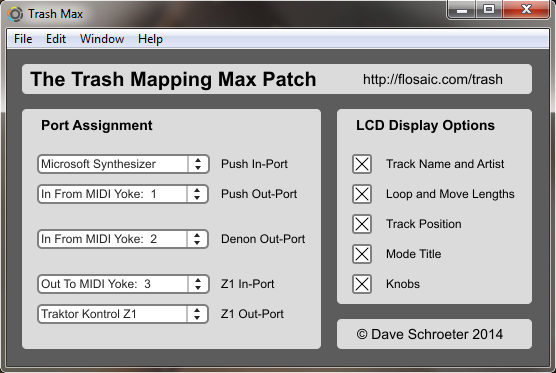
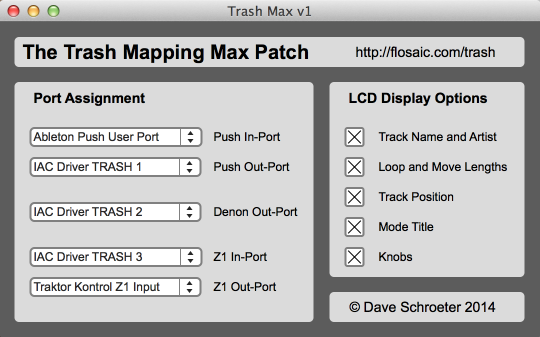
This patch for Cycling '74's Max brings the Push's display to life: labels for the knobs, visual feedback of knob values, loop and move lengths, track position, and track and artist names for Decks A and B. It also keeps the Kontrol Z1 mapping in sync with the main mapping, so the Z1's knobs follow the current mode.
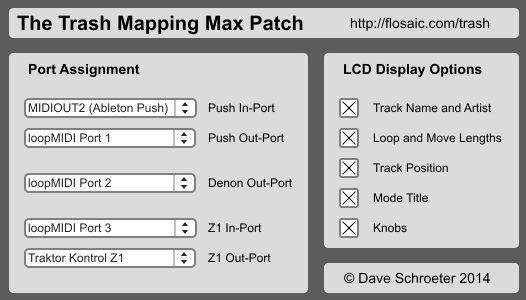
The port labels in the patch (Push In-Port, Denon Out-Port) match the port names in Traktor, and each display section can be switched on or off.
Setup
These steps were written on Windows 7 (64-bit), using MIDI Yoke NT for MIDI routing. If you get Trash working on a different setup, flosaic at gmail dot com so others can benefit.
Install
- Download the files above.
- If you need them, install MIDI Yoke NT and the Max Runtime. With MIDI Yoke NT, use the 32-bit Max Runtime; the 64-bit version doesn't seem to assign ports correctly in this setup.
- Plug in and turn on your Push (and your Z1, if you have one).
- Launch Traktor and open
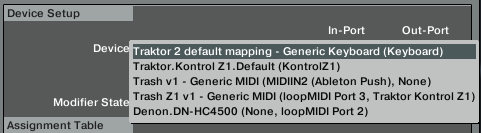
Preferences › Controller Manager. Under Device Setup, chooseAdd… › Import TSI › Import Other…and pickTrash-v1.tsi. Set the In-Port toMIDIIN2 (Ableton Push)and the Out-Port toNone. - Optional, Kontrol Z1: repeat step 4 with
Trash-Z1-v1.tsi. Set its In-Port toOut To MIDI Yoke: 3and its Out-Port toTraktor Kontrol Z1. - Optional, track names: choose
Add… › Denon › DN-HC4500. Set its In-Port toNoneand its Out-Port toOut To MIDI Yoke: 2. Track and artist names for Decks A and B will scroll on the Push.
Every session
The order matters:
- Turn on the Push.
- Launch Traktor.
- Open the Max patch with the 32-bit Max Runtime. Set its ports to match your setup, and switch display sections on or off as you like.
- In Traktor's Controller Manager, select the Trash mapping and set its Out-Port to
None, then toOut To MIDI Yoke: 1. The Push's buttons and display light up. If they don't, switch back toNoneand try again. If there's still nothing, check your MIDI routing. - With a Z1: hold
Modeand pressAandBtogether to enter MIDI mode. The Z1's A and B buttons now follow the Push's deck selection (and so do its EQ knobs). To use their original cueing functions, switch to Decks A and B mode and toggle cueing there.
I don't own a Mac, so these steps are untested. If you get Trash working on a Mac, flosaic at gmail dot com.
Before you begin
Delete any existing Trash or Trash Z1 mapping in Traktor, and set the In and Out ports of all other mappings to None (or something that won't conflict).
Install
- Download
Trash-v1.tsi,Trash-Z1-v1.tsiandTrash-Max-v1.mxf. - Install the latest 32-bit Max Runtime.
- In Audio MIDI Setup, create three virtual MIDI ports with the IAC Driver and name them
Trash 1,Trash 2andTrash 3. - Plug in the Push and Z1, and turn on the Push.
- Launch Traktor and open
Preferences › Controller Manager. - Push: choose
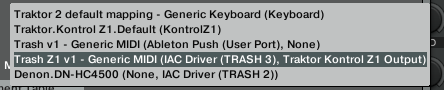
Add… › Import TSI › Import Other…and pickTrash-v1.tsi. Set the In-Port toAbleton Push User Portand the Out-Port toNone. - Kontrol Z1 (optional): import
Trash-Z1-v1.tsithe same way. Set its In-Port toTrash 3and its Out-Port toTraktor Kontrol Z1. - Track names: choose
Add… › Denon › DN-HC4500. Set its In-Port toNoneand its Out-Port toTrash 2. - Close Traktor.
Every session
- Turn on the Push.
- Launch Traktor.
- Open the Max patch with the 32-bit Max Runtime and set its dropdowns, in order, to
Ableton Push User Port,IAC Driver Trash 1,IAC Driver Trash 2,IAC Driver Trash 3andTraktor Kontrol Z1. - In Traktor's Controller Manager, select the Trash mapping and set its Out-Port to
None, then toTrash 1. The Push lights up. If it doesn't, switch back toNoneand try again. - With a Z1: hold
Modeand pressAandBtogether to enter MIDI mode.
Modifier reference
For tinkerers: Traktor modifiers and the states Trash uses for them.
Modifiers and what they control
| Modifier | Controls |
|---|---|
| Modifier 1 | Knob mode |
| Modifier 2 | Global Shift |
| Modifier 3 | FX Unit 1 mode |
| Modifier 4 | FX Unit 2 mode |
| Modifier 5 | Button mode |
| Modifier 6 | Remix Deck subpages |
| Modifier 7 | FX buttons |
| Modifier 8 | Touchstrip |
Mode values
| Value | Knobs (M1) | Buttons (M5) | Touchstrip (M8) |
|---|---|---|---|
| 0 | A/B | A/B | Off (locked) |
| 1 | FX | Prep | Tempo bend |
| 2 | EQ A/B | Remix C | Pitch |
| 3 | Prep | Remix D | Jog |
| 4 | Remix C | C/D | Seek |
| 5 | Remix D | Perform FX | Volume |
| 6 | C/D | Loops / Cues | Filter |
| 7 | EQ C/D | Unused | Crossfade |
Questions
Does the mapping control FX Units 3 and 4?
No. Units 3 and 4 can still run, but you'll need to control them another way.
Why do artist and track names only show for Decks A and B?
The display borrows a Denon controller's output, which only sends info for those two decks.
Why can't I switch the knobs to EQ from Perform FX or Loops & Cues?
Those modes control all four decks, so there's no way to choose which two decks to EQ.
Why didn't you include a certain feature?
Trash covers the functions I use most, within the limits of Traktor's two-condition system. If you think a major feature could be added and have an idea how, flosaic at gmail dot com.
Where is the Prep mode for Deck B?
There's only one Prep mode, and it's for Deck A. My little brain can only process one track at a time!
Credits
Trash took lots of research and help. Thanks to:
- Native Instruments for Traktor
- Ableton for the Push
- Ean Golden and Mad Zach of DJ TechTools for inspiration, mapping videos and track prep ideas
- Siytek and others for reverse-engineering the Denon Traktor output
- Adam Murray for reverse-engineering the Push's display
- Julien Bayle and nativeKONTROL for their Ableton Push documentation
- Hundreds of forum contributors, YouTube uploaders and product manuals
- My wife and three kids, for putting up with me while I built it