Projects / e2sEdit
e2sEdit
A tiny editor for the samples on Korg's electribe sampler.
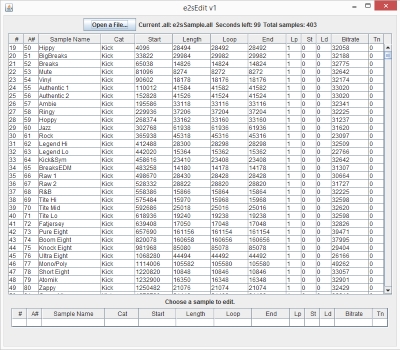
e2sEdit is a small Java application for editing the samples on Korg's electribe sampler. I love the sampler, but not its sample-loading process, and no one seemed to be making software for it, so I wrote my own.
The source is on GitHub, thanks to a kind soul who set up the repository. Contributions welcome!
Features
- Load, delete, replace, audition and export samples
- Tiny (about 33 KB) and fast
- Edit anything that isn't tied down
- One button to loop a sample, great for single-cycle waveforms
- Runs from anywhere, even the SD card (not recommended)
- Free and open source
Known limits
- Written by a complete non-programmer!
- No slice editing of any kind
- Sample audition is iffy at best
- Can't handle .wav files with poorly formatted RIFF data
- No drag and drop or multiple selections
- Can crash without any error reporting
- Probably full of bugs that will destroy data, so make backups of your .all files
Getting started
There's no real installation. Download e2sEdit-v1.jar and put it next to an .all file. If it sits in the same folder as the default e2sSample.all, it loads that file automatically. You can duplicate and rename .all files, and e2sEdit can open and edit those too.
You can also put it directly in the KORG/electribe sampler/Sample folder on your SD card, but I don't recommend that for heavy use, since the app writes, creates and deletes files often.
Using it
Make backups of your .all files! With an .all file loaded, you can edit several fields of each sample in the top pane. Factory samples can be edited, deleted or exported. User sample slots (starting at 501) can load new samples, which can be edited, deleted, replaced or exported. Every sample can be played (auditioned), although that's hit or miss: the code has trouble with very short or very long samples and unusual bitrates (BoostSaw, a factory sample, has a bitrate of 411,357!).
There's no saving: every edit happens right away. When you're done, just close the program and your .all file is ready to load. Most out-of-bounds edits give an error message. If you do something I didn't think of, the program may wig out and crash into the sun, so send me a note about the bug, and don't forget to make backups.
Tips
Categories
One of my favorite surprises: you can change a sample's category away from User, and the sampler handles it just fine. Group your samples by type, and Shift + Oscillator jumps between them. The knob always jumps to the next different category, so keep similar samples next to each other.
Column headers
| Header | Meaning |
|---|---|
| A# | Absolute sample number (just ignore it) |
| Lp | Loop status: 0 for loop, 1 for one-shot |
| St | Stereo |
| Ld | Loudness, also called Play Level |
| Tn | Tuning |
Loop button
Sets the loop end point and a special flag to 0. Great for single-cycle waveforms you want to hold down and play. Click again to go back to one-shot.
Poorly formatted .wav files
Every .wav file starts with a header block that begins with RIFF. Most are well formatted, but some use really non-standard formatting, and e2sEdit will fail ungracefully on them. Re-exporting from Audacity (or similar) fixes it, and often saves space too: in one case, a re-export took a .wav from 70 KB to 3 KB!
Remaining space
The "seconds left" figure is a guesstimate. The good news is that the sampler warns you if you go over, and e2sEdit is a great way to delete extra samples.
The category drop-down
Choosing a category from the drop-down doesn't select that sample's row for editing. Just click the sample's name and you're golden.
Questions?
I'll add answers here as questions come in. flosaic at gmail dot com with yours.